
BenchOS

A lab operating system for molecular and structural biology

Many labs distribute research knowledge across spreadsheets, wikis, lab notebooks, and word of mouth. BenchOS brings all information together into one agentic operating system. BenchOS is a Farnung Lab project.

See project flowPreprint coming soonComing soon
Registry + ELN + SchedulingAI AgentPlasmid ViewerCryo-EM TrackingKnowledge Database
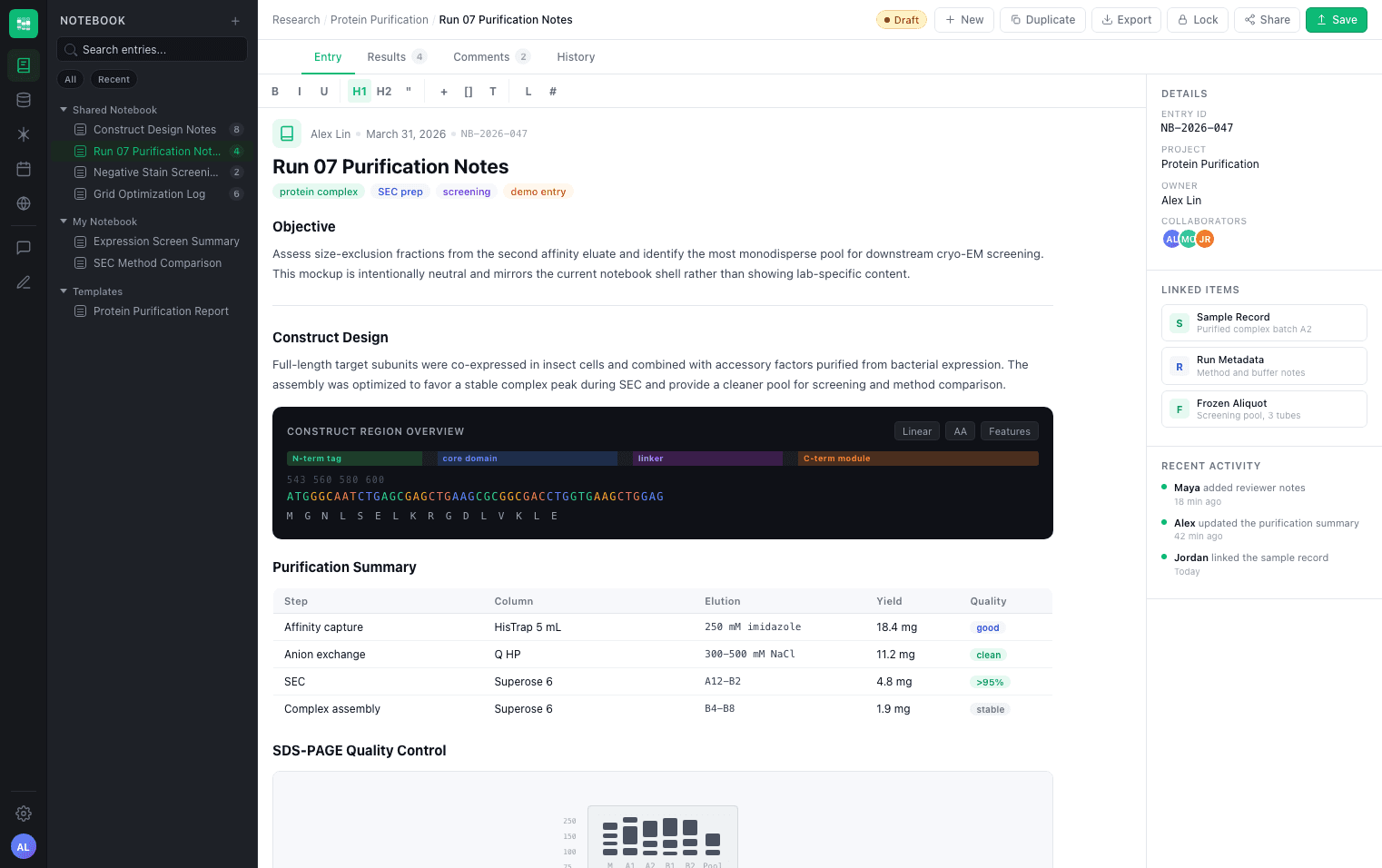
BenchOS notebook screenshot

Highlights

An overview of BenchOS

BenchOS is designed as one connected platform: registry values feed notebook widgets, scientific properties are calculated automatically, and Benchmate can use the full integrated context directly inside the lab workflow.

BenchOS agent01

Benchmate

Benchmate is the BenchOS chat agent. Benchmate is designed to help you work faster. Because notebook entries, registry records, scheduling, and derived scientific values like absorption coefficients or molecular weights of your proteins live in the same system, Benchmate can use that context directly to calculate experimental setups, organize information, handle files, and act on BenchOS data.

Summary
Connected agent
Benchmate works with the same live records, notebook context, and derived values that the rest of BenchOS uses.
ELN02

Notebook

Capture daily experiments, protocols, observations, and results in an electronic lab notebook built for real scientific work. Your registry items appear inside notebook entries as live widgets, so calculated properties like molecular weight and absorption coefficients stay linked, current, and usable in context.

Summary
Linked notebook
Notebook pages embed registry-backed widgets, perform calculations, and can be updated by Benchmate.
Database03

Registry

Track the materials behind every experiment, from plasmids, cell lines and protein preparations to instruments and cryo-EM grids. The Registry gives teams a clear, searchable source of truth for the assets they use and produce, with properties like molecular weight and absorption coefficients calculated automatically and available across BenchOS.

Summary
Structured source
Registry records do not just store metadata. They generate reusable scientific values that flow into the rest of the platform.
Knowledge Data Bank04

The Universe

The Universe turns registry data into a richer scientific view of your proteins. It is Uniprot on steroids with your lab's knowledge about a protein.

Summary
Scientific context
The Universe is your database to annotate mutants, constructs, and all information about a protein.
Lab Organization05

Equipment Booking

Coordinate shared instruments with a scheduling system built for busy labs. Equipment Scheduling makes it easier to see availability, reserve time, and manage bookings across the team.

Summary
Clear availability
Instrument time stays visible and organized, so booking decisions can happen in the same workflow as the science.
Planning06

Lab Calendar

Keep experiments, timelines, and upcoming work visible in one shared calendar. The Lab Calendar gives teams a live operational view of what is happening in the lab and what is coming next.

Summary
Live operations
The calendar gives you a picture of your active work, upcoming milestones, and timing across projects.

Workflow

Biology-native records, one project, Benchmate at every step

This timeline follows one SPT6 cloning workflow from primer design through clone verification and record creation. Benchmate not just answers questions. Benchmate creates and updates notebook and registry entries. Benchmate performs molecular biology and structural biology.

01
Primer Design

Benchmate designs SPT6 primers from project context

S
Scientist
to Benchmate
Benchmate response
1
Reads the SPT6 target, vector context, and planned assembly from BenchOS records and public databases like UniProt.
2
Employs Skills to deterministically propose forward and reverse primers with cloning-ready overhangs.
3
Creates linked primer records that stay available for later PCR and clone QC steps.
Generated records
Primer set — BOS-PR-201 / BOS-PR-202
Target
SPT6 CDS
Forward
SPT6_GIB_F
Reverse
SPT6_GIB_R
Overhangs
pBOS-438C Gibson arms
Why it matters
Primer design is a reusable, always executable agent skill.
02
PCR Planning

Benchmate suggests PCR conditions using the same primers

S
Scientist
to Benchmate
Benchmate response
1
Uses the stored primer design and amplicon context instead of starting from scratch.
2
Suggests annealing temperature, extension time, polymerase choice, and cycle count.
3
Writes the PCR plan into the linked notebook entry so the setup is preserved in record context.
Notebook update
ELN plan — ELN-612
Polymerase
Q5 High-Fidelity
Annealing
68C
Extension
2 min 45 s
Cycles
30
Why it matters
The experimental plan stays attached to the same project chain as the primers and target construct.
03
Clone Check

Benchmate verifies the resulting clone against sequencing

S
Scientist
to Benchmate
Benchmate response
1
Compares the sequencing files to the expected construct sequence already in the registry.
2
Summarizes whether insert identity, orientation, and verification status pass review.
3
Keeps the QC result tied to the actual clone instead of leaving it buried in free-form notes.
Verification result
Clone QC — C07
Expected insert
SPT6 full length
Trace files
clone_C07.ab1
Verification
match confirmed
Decision
promote to construct
Why it matters
Benchmate can reason over files and records together when deciding whether a clone is correct.
04
Registry Entry

Benchmate creates the clone record and calculates scientific properties

S
Scientist
to Benchmate
Benchmate response
1
Creates the construct record directly from the verified clone and its lineage.
2
Calculates molecular weight and absorption coefficient automatically from the sequence context.
3
Links the new record back to the primers, notebook work, and sequencing evidence.
Registry record
Construct — BOS-PL-227
Clone
SPT6 full length / C07
Molecular weight
165.3 kDa
Absorption coeff.
201,980 M-1 cm-1
Parent vector
pBOS-438C
Why it matters
Derived values become part of the structured record immediately, ready for downstream planning and reuse.
05
Notebook Widget

Benchmate brings the clone back into the notebook as a live widget

S
Scientist
to Benchmate
Benchmate response
1
Embeds the construct record inside the notebook entry instead of duplicating values by hand.
2
Displays registry-backed data like molecular weight, absorption coefficient, and verification state as live notebook content.
3
Leaves Benchmate able to answer follow-up questions from the same notebook and record context later on.
Notebook widget
ELN-613 — Linked construct panel
Embedded record
BOS-PL-227
Visible values
MW / epsilon280 / verification
Linked assets
primers, PCR plan, clone trace
Next step
expression test setup
Why it matters
The notebook is part of the platform, so live scientific values stay usable in-place by both scientists and Benchmate.

Biology-Native Records

BenchOS works with the actual objects your lab cares about

Plasmids, preps, expression runs, cryo-EM grids, references, and experiment notes can be connected as structured entities instead of being scattered across databases, spreadsheets, wikis, notebooks, and word-of-mouth.

benchos

BenchOS for
structured lab workflows

BenchOS links constructs, samples, experiments, and files so the agent can work with the same context as the underlying records.